
Reading through this now. It’s quite helpful. A good introduction to Netconf for those already familiar with Junos.
NetConf: XML Namespaces
I’ve been bashing my head tonight against XML namespaces tonight. It looks like I have to qualify my XPATH statements with the namespace at each level. e.g… (where j is a namespace label mapped to a URI)
“j:chassis-inventory/j:chassis/j:serial-number/text()”
This is unwieldy. I started poking around the Juniper/ncclient github repo because I didn’t remember having to qualify the hell out of everything with Python and I found that there is a proc that does an XSLT to strip namespaces from the RPC reply. There is probably some drawback that I haven’t yet considered. But so far it seems like it will declutter my XPATH statements considerably if I do so.
[juniper-helpers] I will be doing XML Parsing in TCL using tDom
Looks like tDom is going to be my pick for parsing XML outputs gathered by NetConf. I’m trying to figure out how to incorporate this into my Juniper Helpers TCL framework which I am actively developing.
I had been learning a lot of python because I was being silly and convinced that it had a better community than TCL. Now I am not so sure that that’s totally true.
And ultimately it doesn’t matter. I’m having fun and writing something interesting… and that’s what counts!
Exploring NetConf with SSH
I spent a bit of time tonight exploring NetConf using openssh and a notepad. Per RFC 6242, you initiate a NetConf session to router r1 (user ‘lab’) as follows:
ssh lab@r1 -p 830 -s netconf
And a handy reminder for those of you using JUNOS, you can get the XML-RPC equivalent of any command by piping the command to “| display xml rpc”
lab@R1> show chassis hardware detail | display xml rpc
xml
  <rpc-reply xmlns:junos="http://xml.juniper.net/junos/12.1X46/junos">
      <rpc>
          <get-chassis-inventory>
                  <detail/>
          </get-chassis-inventory>
      </rpc>
      <cli>
          <banner></banner>
      </cli>
  </rpc-reply>
Auto: Fixing Foggy Windows
If your car has foggy windows when it’s cold and wet out, please do the following.
- Turn on the AC
- Turn the cold/warm dial to the warm side
- IMPORTANT: Turn off recirculation
“A person who doesn’t expect something for nothing is a lot harder to scam.”
#JUNOS - Recovering from Alternate Media (YMMV)
Had a situation at work where I had to remind myself of something so that means it’s time for a new blog post.
--- JUNOS 12.3R3.4 built 2013-06-14 00:09:12 UTC
---
--- NOTICE: System is running on alternate media device      (/dev/ad1s1a).
---

fluong@tickle-me-elmo-re0> show system storage | no-more
Filesystem              Size       Used      Avail  Capacity   Mounted on
/dev/ad1s1a             3.5G       283M       3.1G        8%  / <<<<<
devfs                   1.0K       1.0K         0B      100%  /dev
/dev/md0                 41M        41M         0B      100%  /packages/mnt/jbase
/dev/md1                 32M        32M         0B      100%  /packages/mnt/jkernel64-12.1R1.9
/dev/md2                 73M        73M         0B      100%  /packages/mnt/jpfe-X960-12.1R1.9
/dev/md3                5.0M       5.0M         0B      100%  /packages/mnt/jdocs-12.1R1.9
/dev/md4                 78M        78M         0B      100%  /packages/mnt/jroute-12.1R1.9
/dev/md5                 28M        28M         0B      100%  /packages/mnt/jcrypto64-12.1R1.9
/dev/md6                 46M        46M         0B      100%  /packages/mnt/jpfe-common-12.1R1.9
/dev/md7                388M       388M         0B      100%  /packages/mnt/jruntime-12.1R1.9
/dev/md8                7.9G        22K       7.2G        0%  /tmp
/dev/md9                7.9G        15M       7.2G        0%  /mfs
/dev/ad1s1e             394M        42K       390M        0%  /config
procfs                  4.0K       4.0K         0B      100%  /proc
/dev/ad1s1f              18G       2.3G        14G       14%  /var
Here’s the initial scenario. Routing-Engine re0 is booting from alternate media. IN MOST CASES this means a compact-flash on the routing has gone bad and has to be replaced by RMA, but in this case I happen to know that it’s a new RE and we had a USB install that went south. Keep this in mind and know that your mileage may vary with this one.
Other interesting considerations for this scenario is that for this router, a remote hands technician is not on site so we don’t have cheap easy options to do another USB install. Luckily JUNOS provides a means to rewrite the image on the compact-flash if you’re able to boot off the HDD/SSD: “request system snapshot partition”
{backup}
root@tickle-me-elmo-re0> request system snapshot partition
Clearing current label...
Partitioning compact-flash media (ad0) ...
Partitions on snapshot:

  Partition  Mountpoint  Size    Snapshot argument
      a      /           671MB   root-size
      e      /config     400MB   config-size
      f      /var        2GB     var-size
Running newfs (671MB) on compact-flash media  / partition (ad0s1a)...
Running newfs (400MB) on compact-flash media  /config partition (ad0s1e)...
Running newfs (2GB) on compact-flash media  /var partition (ad0s1f)...
Copying '/dev/ad1s1a' to '/dev/ad0s1a' .. (this may take a few minutes)
Copying '/dev/ad1s1e' to '/dev/ad0s1e' .. (this may take a few minutes)
The following filesystems were archived: / /config

{backup}
root@tickle-me-elmo-re0> exit
We verify that the compact-flash is in the boot list before rebooting.
root@tickle-me-elmo-re0% sysctl machdep.bootdevs
machdep.bootdevs: usb,compact-flash,disk1,disk2,lan

root@tickle-me-elmo-re0% cli req sys reboot

*** FINAL System shutdown message from root@tickle-me-elmo-re0 ***

System going down IMMEDIATELY
When your router boots next time, you should be able to verify that the root “/” partition is /dev/ad0xxx (for RE-S-1800). (marked below with “<<<<<<”)
fluong@tickle-me-elmo-re0> show system storage | no-more
Filesystem              Size       Used      Avail  Capacity   Mounted on
/dev/ad0s1a             3.5G       272M       2.9G        8%  / <<<<<<
devfs                   1.0K       1.0K         0B      100%  /dev
/dev/md0                 40M        40M         0B      100%  /packages/mnt/jbase
/dev/md1                 19M        19M         0B      100%  /packages/mnt/jkernel64-11.4R3.7
/dev/md2                 60M        60M         0B      100%  /packages/mnt/jpfe-X960-11.4R3.7
/dev/md3                5.0M       5.0M         0B      100%  /packages/mnt/jdocs-11.4R3.7
/dev/md4                 78M        78M         0B      100%  /packages/mnt/jroute-11.4R3.7
/dev/md5                 28M        28M         0B      100%  /packages/mnt/jcrypto64-11.4R3.7
/dev/md6                 45M        45M         0B      100%  /packages/mnt/jpfe-common-11.4R3.7
/dev/md7                382M       382M         0B      100%  /packages/mnt/jruntime-11.4R3.7
/dev/md8                7.9G        18K       7.2G        0%  /tmp
/dev/md9                7.9G       744K       7.2G        0%  /mfs
/dev/ad0s1e             393M        44K       362M        0%  /config
procfs                  4.0K       4.0K         0B      100%  /proc
/dev/ad1s1f              18G       1.7G        15G       10%  /var
Word Macros, Recovered
The upgrade to Office 2013 killed my word macros which were in normal.dot or some kind of global template. I did some work today to recover them using old copies, which I had backed up to Evernote and here on my blog.
I spent a bit of time trying to get them to work better. The search with formatting can be a bit surprising. I think I came up with a good way to search through the contents of a file from start to finish by getting the page number of a selection and ending the loop when we get to a point where the page number of the current selection is lower than the page number of the previous selection. (see ABB_highlight_brute)
Here they are. Copy and paste if they help you. And, feel free to drop me a note if you do on twitter: @francisluong

This #bass got a new life today as a Tenor 5-string - E-to-C. It had frustrated me for years in tone and playability and now that I changed the strings and gave it a full setup, it sounds and plays so much better.
Relatively short scale (compared to my other basses), neck-through for sustain and high-register access, narrow string spacing. It makes so much sense for it to be the way it is now, in hindsight.
“Never lose the groove in order to find a note. @Victor Wooten”
Windows 7: Dead Space Between Extended Displays
My workmate seems to have run into this problem today: he has a gap of dead space between his extended displays. A sort of no man’s land where windows go unnoticed.
I borrowed these images from the site where I got the solution:
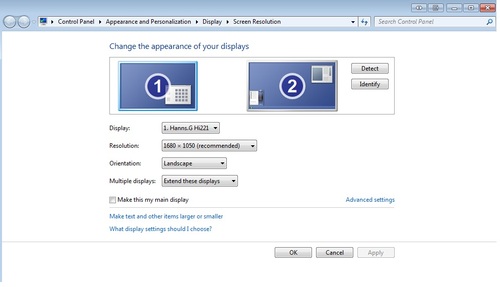
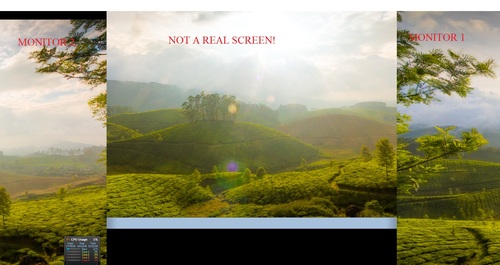
Fix: removed the display device drivers for a rogue iPad Air Display app.



Jellyfish from the National Aquarium
““Love is a decision, it is a judgment, it is a promise. If love were only a feeling, there would be no basis for the promise to love each other forever. A feeling comes and it may go. How can I judge that it will stay forever, when my act does not involve judgment and decision.”
― Erich Fromm, The Art of Loving
”
#JNCIP-ENT: BGP, TCP MSS, and MTU Discovery
Came across this one while studying for the JNCIP-ENT.
Quick Summary:
- mtu-discovery is disabled by default
- TCP MSS for non-direct peerings: 512-byte
- thus convergence can be improved by enabling mtu-discovery
http://www.youtube.com/watch?v=eynnYLXW3Fo&feature=share →
Damn Dude… sounds good.
#JNCIE-SP: Using "Show TED Database" to Troubleshoot CSPF
I’ve generally found the output of show TED database to be a bit cryptic. But I ran into an issue today which forced me to really buckle down and figure out what it means and I think I’ve got something worked out.
fluong@SPOCK-re0> show mpls lsp
10.0.0.110  0.0.0.0      Dn     0       -                SPOCK-to-SULU
It was a sad sight. The LSP was down and the log from show mpls lsp extensive only had one line:
1 Jun 27 14:27:20.553 CSPF failed: no route toward 10.0.0.110[927 times]
I sanity checked my loopback addresses and made sure that family mpls was configured on all backbone interfaces and was included in protocols rsvp and mpls. Everything looked good on SPOCK.
So I started looking at “show ted database”.
fluong@SPOCK-re0> show ted database 10.0.0.110
TED database: 44 ISIS nodes 44 INET nodes
ID                            Type Age(s) LnkIn LnkOut Protocol
SULU.00(10.0.0.110) Rtr    475     1      2 IS-IS(1)
    To: KIRK-re0.00(10.0.0.5), Local: 10.0.0.170, Remote: 10.0.0.171
      Local interface index: 329, Remote interface index: 456
    To: SCOTTY.00(10.0.0.111), Local: 10.0.0.168, Remote: 10.0.0.169
      Local interface index: 327, Remote interface index: 3
Okay… looks like we’re getting to SULU via a couple of routers, KIRK and SCOTTY. So I logged into the next router down the line, KIRK, and I found that it’s LSP to SULU was also down. So I started sanity checking config.
fluong@KIRK-re0> show mpls lsp ingress
10.0.0.110  0.0.0.0     Dn     0       -                KIRK-to-SULU

fluong@KIRK-re0> show interfaces descriptions ae1
Interface       Admin Link Description
ae1             up    up   To SULU, ae1

fluong@KIRK-re0> show interfaces terse ae1 | match mpls
                                   mpls

fluong@KIRK-re0> show mpls interface
Interface        State       Administrative groups (x: extended)
ae1.0            Up         <none>

fluong@KIRK-re0> show rsvp interface ae1
 <no output>
Bingo! Missing RSVP interface configuration.
It occurs to me that this could be very useful as a quick way to narrow down what interfaces may be missing MPLS configs. Here is my method:
If an LSP is down CSPF reports no route:
- verify loopback address and router-id on the far end
- use the output “show ted database” to trace through performing sanity checks on interface-specific MPLS configs.
- show interface terse (check for family mpls)
- show mpls interface (make sure backbone interfaces are present)
- show rsvp interface (make sure backbone interfaces are present)
- show ldp interface (if applicable, make sure relevant backbone interfaces are present)
Thoughts on improvisation with Janek Gwizdala 1 of 4 (by Janek Gwizdala)
^FL: I like this guy.
Why is there only one car horn on the car? We need to add some horns for “friendly nudge” and maybe “thanks” and maybe “sorry about that, bro!”.
Word VBA Macro: Loop and Highlight Lines Matching Search Text
I’m starting to get more sophisticated vs. my previous attempt, which involved more duplication of code. This code is easier to debug than the version in my previous post because it doesn’t needlessly repeat any stretches of code.
Sub highlight_test_results()
'
' highlight_test_results Macro
' Find instances of "Test Result:" which are not highlighted and:
'  - extend selection to end of line`
'  - highlight it
'

Dim iCount As Integer
Dim searchDone As Boolean
Dim searchTextArray(0 To 0) As String
Dim searchText As Variant
searchTextArray(0) = "Test Result:"
Options.DefaultHighlightColorIndex = wdYellow

For Each searchText In searchTextArray

    Selection.HomeKey Unit:=wdStory

    searchDone = False
    iCount = 0

    Do While searchDone = False And iCount < 1000

        iCount = iCount + 1

        Selection.HomeKey Unit:=wdStory
        With Selection.Find
            .ClearFormatting
            .Forward = True
            .Wrap = wdFindContinue
            .Text = searchText
            .Highlight = False
        End With
        Selection.Find.Execute

        If Selection.Find.Found Then
            Selection.EndOf Unit:=wdLine, Extend:=wdExtend
            Selection.Range.HighlightColorIndex = wdYellow

        Else: searchDone = True
        End If
    Loop
Next searchText

End Sub
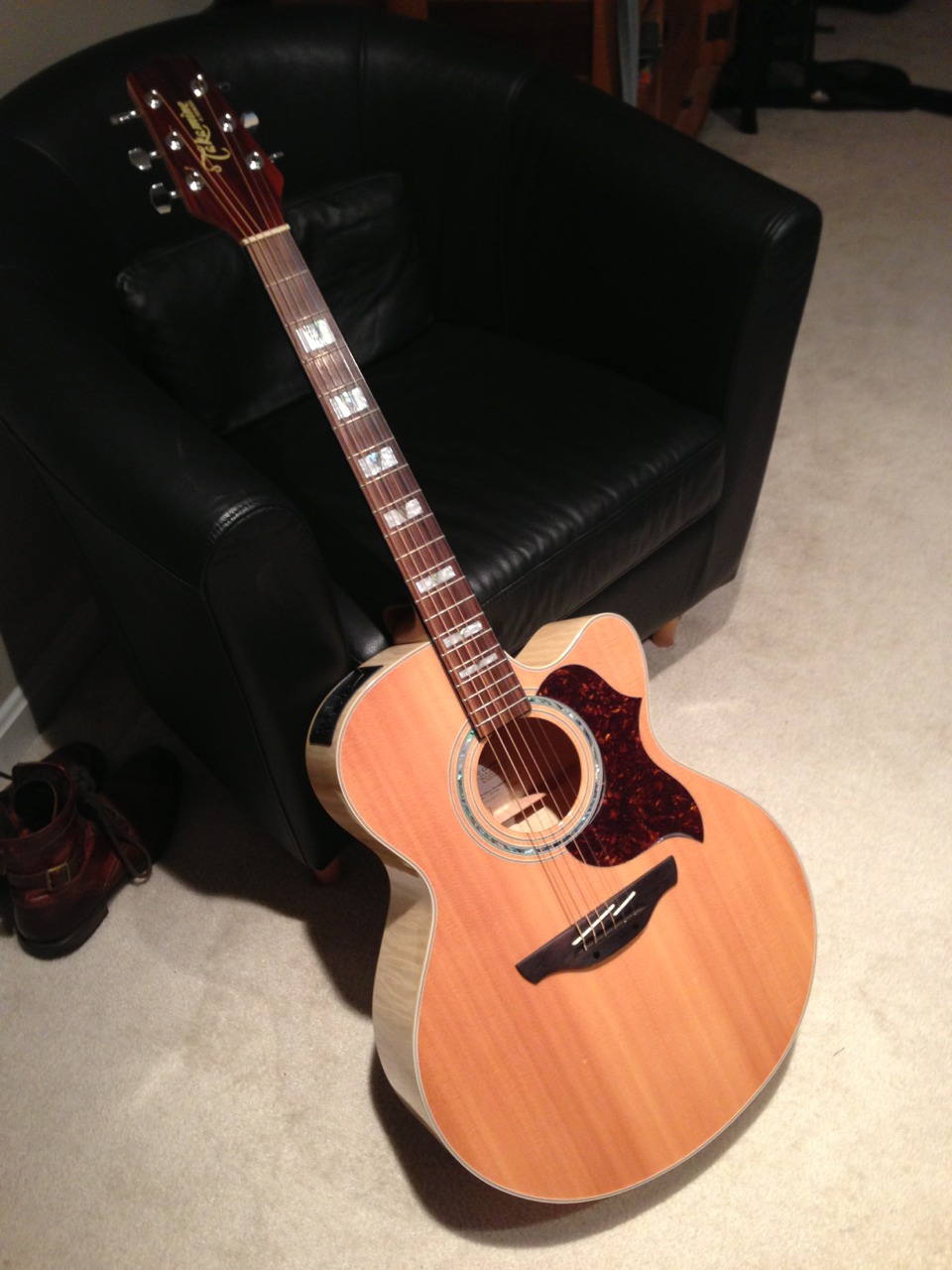
Acquired: Takamine G Series Jumbo Single-cut (EG523SC). Need to find some guitar instruction within easy reach to Reston.