
Fetching Configuration Subtrees Using Netconf

It took me a bit of struggling to figure out how to pull configuration subtrees via NetConf. Part of this was because I was using tags instead of . But also, I was hitting 256 character line-limits.

I’ll work that out later… the main reason for this post is to document what I found on how to get configuration subtrees. This particular example fetches the subtree for a specific neighbor under [protocols l2circuit].

To structure the rpc request, we use the command “get-config” and specify a source of candidate. Then we add a “filter” tag with an attribute of @type=“subtree” and under that we can specify the configuration subtree as xml tags.

<rpc message-id="1002 Tue Jun 17 23:25:48 -0400 2014">
    <get-config>
        <source><candidate/></source>
        <filter type="subtree">
            <configuration>
                <protocols>
                    <l2circuit>
                        <neighbor>
                            <name>192.168.104.69</name>
                        </neighbor>
                    </l2circuit>
                </protocols>
            </configuration>
        </filter>
    </get-config>
</rpc>
]]>]]>

This is the reply I got.

rpc-reply xmlns="urn:ietf:params:xml:ns:netconf:base:1.0" xmlns:junos="http://xml.juniper.net/junos/12.3R4/junos" message-id="1002 Tue Jun 17 23:25:48 -0400 2014">
    <get-config>
        <source><candidate/></source>
        <filter type="subtree">
            <configuration>
                <protocols>
                    <l2circuit>
                        <neighbor>
                            <name>192.168.104.69</name>
                        </neighbor>
                    </l2circuit>
                </protocols>
            </configuration>
        </filter>
    </get-config>
</rpc>
<data>
<configuration xmlns="http://xml.juniper.net/xnm/1.1/xnm" junos:changed-seconds="1402600329" junos:changed-localtime="2014-06-12 19:12:09 UTC">
    <protocols>
        <l2circuit>
            <neighbor>
                <name>192.168.104.69</name>
                <interface>
                    <name>ae0.3909</name>
                    <virtual-circuit-id>55509</virtual-circuit-id>
                </interface>
                <interface>
                    <name>ae0.3933</name>
                    <virtual-circuit-id>55533</virtual-circuit-id>
                </interface>
                <interface>
                    <name>ae0.3959</name>
                    <virtual-circuit-id>55559</virtual-circuit-id>
                </interface>
                <interface>
                    <name>ae0.3983</name>
                    <virtual-circuit-id>55583</virtual-circuit-id>
                </interface>
                <interface>
                    <name>ae0.3991</name>
                    <virtual-circuit-id>55591</virtual-circuit-id>
                </interface>
            </neighbor>
        </l2circuit>
    </protocols>
</configuration>
</data>
</rpc-reply>
]]>]]>

My particular application in this case was that I wanted to get the interface associated with a certain virtual-circuit-id and neighbor. This made it easy to collect what I wanted and to also present the xml for logging.
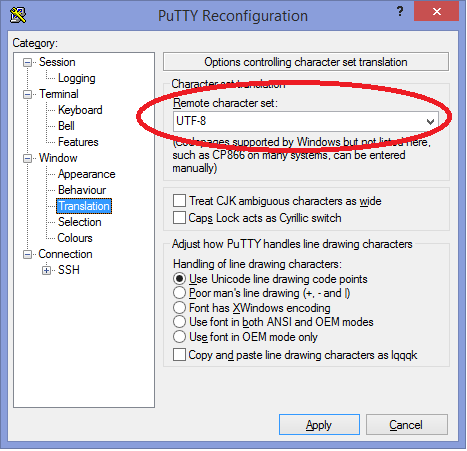
Garbled Text for Tree -- Ubuntu/Putty/UTF-8

I use putty at home to connect to my Ubuntu VMs for development and I was getting garbled output for tree.

fluong@ubuntu:~/pyjnx$ tree
.
âââ auth
â   âââ __init__.py
â   âââ __init__.pyc
â   âââ userpass.py
â   âââ userpass.pyc

I did some searching and found this solution: setting UTF-8 remote character set for putty.

Now everything is pretty and I am happy.

fluong@ubuntu:~/pyjnx$ tree
.
├── auth
│   ├── __init__.py
│   ├── __init__.pyc
│   ├── userpass.py
│   └── userpass.pyc

Data Center Networking @ Facebook by David Swafford

I’ve been looking into data center fabrics and how you handle the scale of large networks lately so I decided I should take some time today to fully view the presentation(video and PDF) by David Swafford which he did at NANOG 59 late last year.

I met David Swafford when Facebook came to town for MPLS 2013. He was a really cool guy. I was inspired even at the time by hearing the way that they are going about support their networks. Very smart!

I took away a lot of nuggets from watching it. Here are a few:

  • Assume we can’t trust any rack
  • We can’t trust networking boxes either
  • Backbone devices are powerful in the wrong ways for a data center. They can handle many routes but don’t have the desired port density.
  • Going from 2 large leaf switches to many smaller leaf switches allows you to move from 1+1 to N+1.
  • Beware of silent failures by complex networking devices. They are hard to detect, BTW.
  • Automating ToR switch upgrades and handing a “push-button” interface to the service owners helped to remove the roadblocks for full upgrades of ToR switches. (I found it analogous to app upgrades on my phone)
  • They even scripted many parts of the process, such as determining who the on-call is for a given group at a given time. Fascinating.

Monitor all the things:

  • interface statistics and state
  • bgp statistics and state
  • FIBs
  • TCP retransmits

Respond to your Alerts with Automation:

  • FBAR stands for Facebook Automation Remediation
  • Receive Alert, login to device, verify still down, either ignore or remedy.

He also covers a lot of thoughts on engineers that automate:

  • Spend less time doing repetitive tasks
  • Spend more time solving interesting problems or learning

His final challenge: What would you do if you weren’t afraid?

Shared Thoughts on the Path to Network Programmability

I wanted to share a really well written blog post that is based on a presentation about the evolution of Network Programmability. One of the things I tend to like about a strong presentation is that it covers enough history and current context to make the content relevant to its audience. The writer of this article does that amazingly well. I’m glad to share it since I agree with much of what he said and it dovetails with my thinking on the subject.

Here are some of the points summarized: - We need a new model. We need to put into place a methodology that allows us to interact with the network in the same way that we design it. - Purchasing products or building solutions that do the [high level abstractions], without a mastery of [fundamental technologies],.. will inevitably result in failure. - At scale, repetitive tasks are the not-so-silent killer…. These repetitive tasks tend to occupy a lot of time, mostly for those whose time is really valuable… These tasks are prime candidates for automation. - Some kind of centralization will win out. - No, you do NOT need to become a programmer, but you can if you truly want to. - “The truth is that we don’t need all network engineers to learn code. We need network engineers to solve networking problems. We also need a smaller subset of these folks to tackle the problems in existing tool sets and getting the networking discipline to understand how to improve processes for the better.”

We’re not arguing… I’m just explaining why I’m right!!!
— John Felkins

3 Fallacies That Prevent Network Engineers From Learning Scripting and Automation

3 Fallacies That Prevent Network Engineers From Learning Scripting and Automation

I don’t have enough time right now…

Life feels full. There are constant demands on your time. Maybe you’d feel overwhelmed if you took on just a little bit more. I understand. We’ve all been there. “I just have to get done with XXX and then things will settle down and then I’ll be able to start this new thing.” But will you really be done with project XXX any time soon? Will things really settle down afterward? And if they do, will you remember that there was this thing that you wanted to start?

If we were more honest, we might admit that there is never a perfect time to start some things: Parenting. Working out. Learn to play guitar. Learning a new language.

I’m willing to bet that in your recent past, you were able to find time for shopping for that new iPad, or Television, or Car. You probably didn’t even need to find the exact “right time” to start any of that… you just started it and it got done.

The irony about learning how to code is that your life would be so much less overwhelming if only you had some tools to make your computers do more of the work for you. You have to make a small commitment to get to the point of not being overwhelmed. This has to be paid upfront and there is never a good time to start. But if you look at that from another perspective, if there is never a good time to start, then you can get started any time… right now even!

I don’t know any languages…

This seems like a big stumbling block. You don’t know how to code. At all!

And let’s face it… coding is about as hard as learning to speak a new language. The comparison is apt. And here are some thoughts to challenge the way you think about both:

  1. You have never learned any language by not speaking it.
  2. You have never become fluent in any language in a classroom.
  3. All languages are only learned by immersing yourself in their use.

And to immerse yourself, you have to embrace discomfort. And you have to do this often enough until it is not awkward. My advice to those who want to start learning a new language is to just start speaking it and let yourself be awkward for the first bit. Wanna learn to code? Just start writing code.

I don’t know how to begin…

If you are being held back by this thought, you are close to starting. Especially if you ask yourself or people around you how to begin. Or, more specifically, “What’s the smallest step I can take today to code?”.

Start small. Your first bit of code doesn’t even have to be useful.

Anticipate frustration and persist a little bit. When you encounter frustration, set a timer for 10 minutes during which time you will perform google searches for similar examples and try to mimic the examples to get things to work for whatever your current small project is. Then reward yourself with a break.

Make it a new habit. Use your new language skills a little each day. Those skills are either in growth or decay. You need to keep them growing.

Don’t overdo it and burn out.

Building Blocks toward Network Device Scripting

Here is a collection of building block steps I have used to get started:

  1. Learn a language
  2. Script login to a router using SSH
  3. Collect “Show Version” using SSH
  4. Script a configuration add to a router.
  5. Have your script isolate the line containing the version number of the router.
  6. Have your script isolate the text of the version number of the router.
  7. Use regular expressions to check that the version of the router is some expected value.
  8. Write a script to upload/download files to/from the router
  9. Learn XML and XPATH
  10. Script a login to a router using NetConf over SSH
  11. Using NetConf, get the version, config, hardware inventory of a router

I used these steps and assembled an API for TCL/EXPECT which will make steps 1-10 pretty darn easy.

Scratch Notes on Benevolent Self-Interest

  • On a grand scale, no one else can figure out what you need to take care you.
    • Secure your own mask before helping others with theirs.
    • Self-interest gets a bad rap when the range is lop-sided. When we see a person destroying their long-term goals (and maybe those of others) in pursuit of the short-term gain, it’s hard to feel like this person is doing justice to himself/herself or the world. Self-interest is often benevolent when the range of a person’s actions are not lop-sided.
    • It is easier to trust a person when you can understand how they benefit from their own actions and that it isn’t at your expense.
    • Self-interest doesn’t preclude and often includes concern for the well-being of your associates and respect for those engaged in a similar struggle.
    • Two people engaged in a relationship that don’t speak their minds will find that the relationship will reach a point of frustrating mediocrity. You have to represent your perspective, your likes, and your interests. You have to take positions and be willing to revise them.
    • Free-Market Capitalism, the political philosophy of self-interest-therefore-liberty, has done more for the poor than the altruistic and tyrannical political philosophies.

Every American understands these things on some gut level but a lot of Americans struggle with being identified as self-interested.

Unit testing with tcltest

Thanks to a very helpful online blog tutorial, I was able to get going with some real unit testing for my juniper-helpers library on github. This is going to be very handy to have.

  fluong@ubuntu:~/juniper-helpers/test$ ./all.tcl
  Tests running in interp:  /usr/bin/tclsh8.5
  Tests located in:  /home/fluong/Dropbox/code/juniper-helpers/test
  Tests running in:  /home/fluong/Dropbox/code/juniper-helpers/test
  Temporary files stored in /home/fluong/Dropbox/code/juniper-helpers/test
  Test files run in separate interpreters
  Running tests that match:  *
  Skipping test files that match:  l.*.test
  Only running test files that match:  *.test
  Tests began at Sun Mar 09 21:22:38 EDT 2014
  gen.tcl.test
  ++++ range_1_1 PASSED
  ++++ range_1_2 PASSED
  ++++ range_1_10 PASSED
  ++++ range_2_10_2 PASSED
  ++++ ipv4_count_0 PASSED
  ++++ ipv4_count_1 PASSED
  ++++ test_ipv4_1024_incr_third_octet PASSED
  textproc.tcl.test
  ++++ nsplit_single_line PASSED
  ++++ nsplit_basic_1 PASSED
  ++++ njoin_single_item PASSED
  ++++ njoin_basic_1 PASSED
  ++++ nrange_0_0 PASSED
  ++++ nrange_0_1 PASSED
  ++++ nrange_end PASSED

  Tests ended at Sun Mar 09 21:22:38 EDT 2014
  all.tcl:        Total   14      Passed  14      Skipped 0       Failed  0
  Sourced 2 Test Files.

JUNOS - How to Configure an MSTP Instance for VPLS

WARNING: THIS CONFIGURATION DOES NOT WORK AND IS NOT SUPPORTED

Update: Looks like this configuration may not work at all… I may update this post when I get more information. In the meantime, reference: http://www.juniper.net/techpubs/en_US/junos12.3/topics/usage-guidelines/vpns-configuring-vpls-and-integrated-routing-and-bridging.html

Given this vpls config

routing-instances VPLS {
    instance-type vpls;
    interface ge-1/1/0.4000;
    interface ge-1/1/1.4000;
    interface ge-1/1/2.4000;
    interface ge-1/1/3.4000;
    vrf-target target:1:1;
    forwarding-options {
        family vpls {
            flood {
                input VPLS-BUM-POLICER;
            }
        }
    }
    protocols {
        vpls {
            site local-site {
                automatic-site-id;
            }
        }
    }
}

interfaces ge-1/1/XXX {
    flexible-vlan-tagging;
    mtu 9188;
    encapsulation flexible-ethernet-services;
    unit 4000 {
        description "VPLS Instance";
        encapsulation vlan-vpls;
        vlan-id-list 4000-4029;
        family vpls;
    }
}

Here is the MSTP Configuration

routing-instances MSTP {
    instance-type layer2-control;
    /* don't configure interfaces at this level */
    protocols {
        mstp {
            /* don't include units on the interface configs */
            interface ge-1/1/0;
            interface ge-1/1/1;
            interface ge-1/1/2;
            interface ge-1/1/3;
            /* put VLANs you're not interested in another msti instance */
            msti 1 {
                vlan [ 1-3999 4030-4094 ];
            }
        }
    }
}

Show commands will need to have the name of the routing instance added

fluong@victor-wooten> show spanning-tree bridge routing-instance MSTP
Feb 28 18:00:26
STP bridge parameters
Routing instance name               : MSTP
Context ID                          : 2
Enabled protocol                    : MSTP

STP bridge parameters for CIST
  Root ID                           : 32768.5c:5e:ab:d2:73:d2
  CIST regional root                : 32768.5c:5e:ab:d2:73:d2
  CIST internal root cost           : 0
  Hello time                        : 2 seconds
  Maximum age                       : 20 seconds
  Forward delay                     : 15 seconds
  Number of topology changes        : 1
  Time since last topology change   : 820 seconds
  Local parameters
    Bridge ID                       : 32768.5c:5e:ab:d2:73:d2

STP bridge parameters for MSTI 1
  MSTI regional root                : 32769.5c:5e:ab:d2:73:d2
  Hello time                        : 2 seconds
  Maximum age                       : 20 seconds
  Forward delay                     : 15 seconds
  Number of topology changes        : 0
  Local parameters
    Bridge ID                       : 32769.5c:5e:ab:d2:73:d2


fluong@victor-wooten> show spanning-tree interface routing-instance MSTP
Feb 28 18:00:55

Spanning tree interface parameters for instance 0

Interface    Port ID    Designated      Designated         Port    State  Role
                         port ID        bridge ID          Cost
ge-1/1/0        128:51       128:51  32768.5c5eabd273d2     20000  FWD    DESG
ge-1/1/1        128:52       128:51  32768.5c5eabd273d2     20000  BLK    BKUP
ge-1/1/2        128:53       128:53  32768.5c5eabd273d2     20000  FWD    DESG
ge-1/1/3        128:54       128:53  32768.5c5eabd273d2     20000  BLK    BKUP 


fluong@victor-wooten> show spanning-tree mstp configuration routing-instance MSTP
Feb 28 18:01:13
MSTP configuration information
Context identifier     : 2
Revision               : 0
Configuration digest   : af:0c:a9:14:79:da:16:86:71:e3:ae:cd:7b:00:d4:63


MSTI     Member VLANs                                                      
   0      0,4000-4029                                                     
   1      1-3999,4030-4094

NetConf: XML Namespaces

I’ve been bashing my head tonight against XML namespaces tonight. It looks like I have to qualify my XPATH statements with the namespace at each level. e.g… (where j is a namespace label mapped to a URI)

“j:chassis-inventory/j:chassis/j:serial-number/text()”

This is unwieldy. I started poking around the Juniper/ncclient github repo because I didn’t remember having to qualify the hell out of everything with Python and I found that there is a proc that does an XSLT to strip namespaces from the RPC reply. There is probably some drawback that I haven’t yet considered. But so far it seems like it will declutter my XPATH statements considerably if I do so.

[juniper-helpers] I will be doing XML Parsing in TCL using tDom

Looks like tDom is going to be my pick for parsing XML outputs gathered by NetConf. I’m trying to figure out how to incorporate this into my Juniper Helpers TCL framework which I am actively developing.

I had been learning a lot of python because I was being silly and convinced that it had a better community than TCL. Now I am not so sure that that’s totally true.

And ultimately it doesn’t matter. I’m having fun and writing something interesting… and that’s what counts!

Exploring NetConf with SSH

I spent a bit of time tonight exploring NetConf using openssh and a notepad. Per RFC 6242, you initiate a NetConf session to router r1 (user ‘lab’) as follows:

ssh lab@r1 -p 830 -s netconf

And a handy reminder for those of you using JUNOS, you can get the XML-RPC equivalent of any command by piping the command to “| display xml rpc”

lab@R1> show chassis hardware detail | display xml rpc

xml <rpc-reply xmlns:junos="http://xml.juniper.net/junos/12.1X46/junos"> <rpc> <get-chassis-inventory> <detail/> </get-chassis-inventory> </rpc> <cli> <banner></banner> </cli> </rpc-reply>

Auto: Fixing Foggy Windows

If your car has foggy windows when it’s cold and wet out, please do the following.

  1. Turn on the AC
  2. Turn the cold/warm dial to the warm side
  3. IMPORTANT: Turn off recirculation

A person who doesn’t expect something for nothing is a lot harder to scam.

#JUNOS - Recovering from Alternate Media (YMMV)

Had a situation at work where I had to remind myself of something so that means it’s time for a new blog post.

--- JUNOS 12.3R3.4 built 2013-06-14 00:09:12 UTC
---
--- NOTICE: System is running on alternate media device      (/dev/ad1s1a).
---

fluong@tickle-me-elmo-re0> show system storage | no-more 
Filesystem              Size       Used      Avail  Capacity   Mounted on
/dev/ad1s1a             3.5G       283M       3.1G        8%  / <<<<<
devfs                   1.0K       1.0K         0B      100%  /dev
/dev/md0                 41M        41M         0B      100%  /packages/mnt/jbase
/dev/md1                 32M        32M         0B      100%  /packages/mnt/jkernel64-12.1R1.9
/dev/md2                 73M        73M         0B      100%  /packages/mnt/jpfe-X960-12.1R1.9
/dev/md3                5.0M       5.0M         0B      100%  /packages/mnt/jdocs-12.1R1.9
/dev/md4                 78M        78M         0B      100%  /packages/mnt/jroute-12.1R1.9
/dev/md5                 28M        28M         0B      100%  /packages/mnt/jcrypto64-12.1R1.9
/dev/md6                 46M        46M         0B      100%  /packages/mnt/jpfe-common-12.1R1.9
/dev/md7                388M       388M         0B      100%  /packages/mnt/jruntime-12.1R1.9
/dev/md8                7.9G        22K       7.2G        0%  /tmp
/dev/md9                7.9G        15M       7.2G        0%  /mfs
/dev/ad1s1e             394M        42K       390M        0%  /config
procfs                  4.0K       4.0K         0B      100%  /proc
/dev/ad1s1f              18G       2.3G        14G       14%  /var

Here’s the initial scenario. Routing-Engine re0 is booting from alternate media. IN MOST CASES this means a compact-flash on the routing has gone bad and has to be replaced by RMA, but in this case I happen to know that it’s a new RE and we had a USB install that went south. Keep this in mind and know that your mileage may vary with this one.

Other interesting considerations for this scenario is that for this router, a remote hands technician is not on site so we don’t have cheap easy options to do another USB install. Luckily JUNOS provides a means to rewrite the image on the compact-flash if you’re able to boot off the HDD/SSD: “request system snapshot partition

{backup}
root@tickle-me-elmo-re0> request system snapshot partition
Clearing current label...
Partitioning compact-flash media (ad0) ...
Partitions on snapshot:

  Partition  Mountpoint  Size    Snapshot argument
      a      /           671MB   root-size
      e      /config     400MB   config-size
      f      /var        2GB     var-size
Running newfs (671MB) on compact-flash media  / partition (ad0s1a)...
Running newfs (400MB) on compact-flash media  /config partition (ad0s1e)...
Running newfs (2GB) on compact-flash media  /var partition (ad0s1f)...
Copying '/dev/ad1s1a' to '/dev/ad0s1a' .. (this may take a few minutes)
Copying '/dev/ad1s1e' to '/dev/ad0s1e' .. (this may take a few minutes)
The following filesystems were archived: / /config

{backup}
root@tickle-me-elmo-re0> exit   

We verify that the compact-flash is in the boot list before rebooting.

root@tickle-me-elmo-re0% sysctl machdep.bootdevs
machdep.bootdevs: usb,compact-flash,disk1,disk2,lan

root@tickle-me-elmo-re0% cli req sys reboot

*** FINAL System shutdown message from root@tickle-me-elmo-re0 ***            

System going down IMMEDIATELY         

When your router boots next time, you should be able to verify that the root “/” partition is /dev/ad0xxx (for RE-S-1800). (marked below with “<<<<<<”)

fluong@tickle-me-elmo-re0> show system storage | no-more 
Filesystem              Size       Used      Avail  Capacity   Mounted on
/dev/ad0s1a             3.5G       272M       2.9G        8%  / <<<<<<
devfs                   1.0K       1.0K         0B      100%  /dev
/dev/md0                 40M        40M         0B      100%  /packages/mnt/jbase
/dev/md1                 19M        19M         0B      100%  /packages/mnt/jkernel64-11.4R3.7
/dev/md2                 60M        60M         0B      100%  /packages/mnt/jpfe-X960-11.4R3.7
/dev/md3                5.0M       5.0M         0B      100%  /packages/mnt/jdocs-11.4R3.7
/dev/md4                 78M        78M         0B      100%  /packages/mnt/jroute-11.4R3.7
/dev/md5                 28M        28M         0B      100%  /packages/mnt/jcrypto64-11.4R3.7
/dev/md6                 45M        45M         0B      100%  /packages/mnt/jpfe-common-11.4R3.7
/dev/md7                382M       382M         0B      100%  /packages/mnt/jruntime-11.4R3.7
/dev/md8                7.9G        18K       7.2G        0%  /tmp
/dev/md9                7.9G       744K       7.2G        0%  /mfs
/dev/ad0s1e             393M        44K       362M        0%  /config
procfs                  4.0K       4.0K         0B      100%  /proc
/dev/ad1s1f              18G       1.7G        15G       10%  /var

Word Macros, Recovered

The upgrade to Office 2013 killed my word macros which were in normal.dot or some kind of global template. I did some work today to recover them using old copies, which I had backed up to Evernote and here on my blog.

I spent a bit of time trying to get them to work better. The search with formatting can be a bit surprising. I think I came up with a good way to search through the contents of a file from start to finish by getting the page number of a selection and ending the loop when we get to a point where the page number of the current selection is lower than the page number of the previous selection. (see ABB_highlight_brute)

Here they are. Copy and paste if they help you. And, feel free to drop me a note if you do on twitter: @francisluong